DragApps

DragApps
License:
Free
Language:
English
Developer:
Developer's website
OS:
Mac OS X
Added:
See detailed info

Softonic review

Cyril Roger

“Drag and drop actions for your Mac”

by Cyril Roger about DragApps

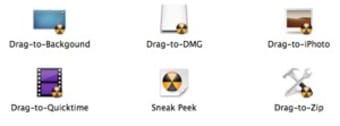
DragApps is a collection of five different drag and drop actions to save you time when working with your Mac.

All you need to do is drag and drop a file onto one of the five different applications depending on what you want to do with it: set as background, create a DMG, import to iPhoto, play in Quicktime or convert to Zip. Dragapps obviously makes use of one of the best features associated with the mouse in drag and drop.

We welcome any application that makes your life on your Mac easier and DragApps is exactly that kind of program. However it's unfortunately too limited to probably become an essential desktop tool. For one, not all of the five actions available are considered absolutely necessary. How many Mac users actually convert files to DMG? Also, don't most Quicktime files open up automatically in the player anyway? DragApps would be a really great application if it could allow you to choose which application or action you would like to associate with drag and drop. As it stands it's useful but limited.

DragApps lets you carry out five very specific actions via drag and drop.

Pros
  • Great productivity tool
  • Smart use of drag and drop
Cons
  • Only 5 different actions
Free Download DragApps 1.0

DragApps is virus free

We have analyzed the latest version of DragApps with 30 antivirus engines and it is virus free. See analysis results.

TESTED VIRUS FREE - Softonic GUARANTEED

Developer's description

Drag a file to one of these applications and DragApps will automatically run a series of actions on the file to get things done fast. DragApps includes the following:

  • Drag-to-Background: drag a picture to this app and it changes it to your background.
  • Drag-to-DMG: drag files onto this app and it creates a DMG with the files.
  • Drag-to-iPhoto: drag a picture to this app and import it into iPhoto (multiple picture support).
  • Drag-to-Quicktime: drag a QT supported video to this app and it plays in Quicktime.
  • Drag-to-Zip: drag files to this app and it converts it into a zip archive.

Review and rate DragApps

Your avatar

Your opinion is important.
Help other users - be the first to review this program.

Review
  1. Maximum: 75 characters

  2. See example

Pros and Cons
Rate
  1. What rating would you give DragApps?

    You need to fill in all fields

    • Usability:

      Not rated
    • Stability:

      Not rated
    • Installation:

      Not rated
    • Functionality:

      Not rated
    • Appearance:

      Not rated
    • Overall rating:

      Not rated
  2. Don't worry, we won't make your email address public.

You're not allowed to share serial numbers, cracks, etc. or link to pages that contain them. If you do, your user account will be deleted, your IP address logged and legal action will be taken.

Get started - just ask a question!

Write a title for your question.

Alternativesto DragApps

Compare with DragApps

Screenshots from DragApps

Download rank: Launchers & Desktop

17 of 63

Softonic rating:
  • Good
  • 7/10
Your rating:
Your rating
  • 0

Review and rate this program

Top Downloads: Launchers & Desktop

  • United States
  • Global

  1. Excellent multi-application launcher